An AI email assistant that actually works inside Gmail.
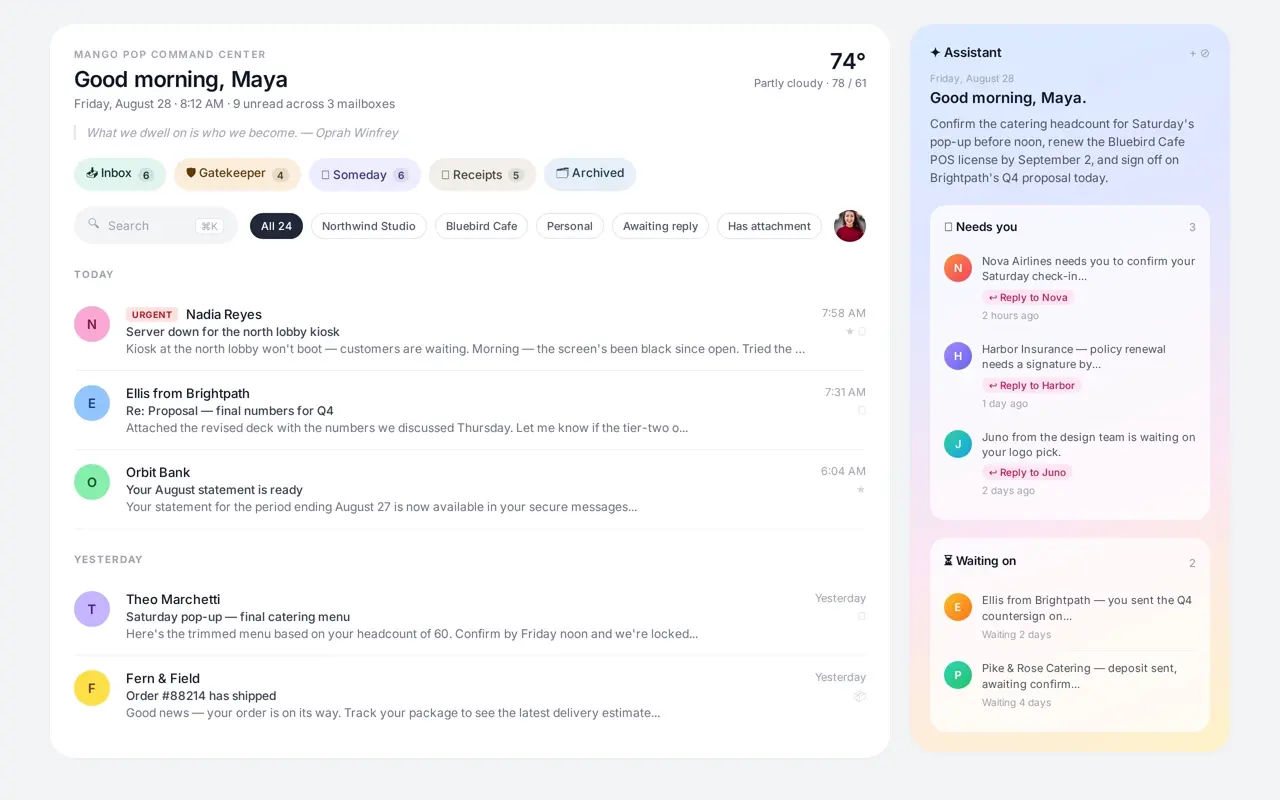
Mango Pop screens every new sender, sorts the rest into Inbox, Someday, and Receipts, and drafts replies in your voice — so you spend less time triaging and more time replying.
- Works on top of Gmail — no new email address needed
- Screens every new sender before they reach your inbox
- Drafts replies in your voice with calendar-aware scheduling
- Free tier available; paid plans start at $12/month
What Mango Pop's AI email assistant handles for you.
From drafting to daily digests, the assistant turns your inbox into a calm, actionable dashboard.
Voice-matched drafts
The AI studies your last sent messages and drafts replies that sound like you, ready to send or edit.
Relationship briefs
Open any contact to see where things stand, what's blocked, and what to do next — with verbatim quotes and dates.
Daily task digest
A 7am email summarising Needs you, Waiting on, Quick FYI, and Today's stuff pulled from your threads.
Calendar-aware replies
Google Calendar integration injects free/busy windows and working hours into scheduling drafts.
Gatekeeper screening
Every new sender waits for approval. Say yes, no, or unsubscribe once and Mango Pop remembers.
Automatic streams
Mail sorts into Inbox, Someday, Receipts, and Gatekeeper so important threads never drown.
Receipts & tracking
Orders, invoices, and shipments are filed automatically with live package tracking at a glance.
Super Save protection
Mark critical threads as protected so bulk archive, delete, and sweep actions leave them untouched.
Today tags
Open to-dos and reminders from the assistant surface as Today tags directly on threads in your list.
Areas
Tell the assistant what belongs in an Area — "mail from or about Biogen" — and your inbox narrows to just that.
Voice typing
Speak instead of type: a mic in the composer and the assistant box turns your words into text.
Why use Mango Pop as your AI email assistant?
Most AI email tools bolt a chatbot onto your inbox. Mango Pop is built around your existing Gmail workflow: screen, sort, draft, and follow up without switching apps.
No address change required
Keep your existing Gmail or Workspace address. Mango Pop is a layer, not a replacement.
Grounded in your threads
Drafts, summaries, and relationship briefs pull from your actual messages and calendar — not generic templates.
Built for speed
Command palette, keyboard shortcuts, and one-tap actions keep you moving without reaching for the mouse.
Questions about the AI email assistant
What does an AI email assistant actually do?
It reads your incoming mail, classifies it, drafts replies that match your voice, extracts tasks and reminders, and surfaces relationship context so you never start from zero.
Does Mango Pop replace Gmail?
No. It sits on top of your existing Gmail or Google Workspace account. Every label, archive, and reply syncs back to Google.
How does the AI learn my voice?
Mango Pop looks at your last sent messages to match tone, length, and common phrases. You can also add standing instructions for sign-offs, formatting, and routing.
Is my email used to train AI models?
No. Message content is only sent to the model when a feature needs it, and it is never used to train public or shared models.
Can I use it on mobile?
Yes. Mango Pop is a PWA that works on iPhone, iPad, and Android with offline caching and push notifications.
Start free, upgrade when you need more AI.
The free tier includes one Gmail account, all four streams, and 25 AI drafts per month. Paid plans add unlimited screening, more AI drafts, daily digests, and team features.