Gatekeeper
Every new sender waits at the door. One tap says yes, no, or yes-then-archive — forever.
Your AI assistant reads every thread, remembers every relationship, and drafts replies in your voice. Strangers wait outside. Newsletters go somewhere else. What is left is the mail that actually matters — already summarised, already drafted.
No migration. No new email address. Disconnect any account in one click.
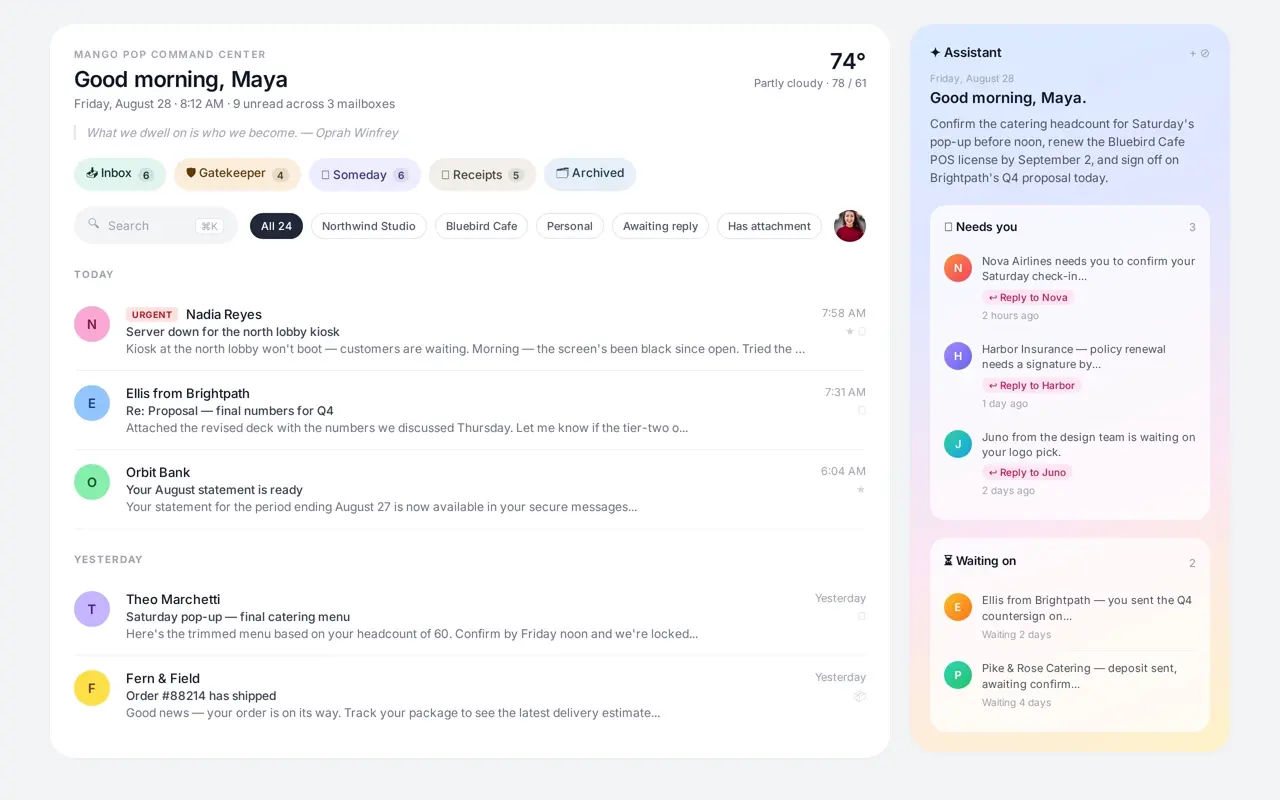
Mango Pop learns how you write, who matters, and what you are waiting on. It drafts replies, surfaces tasks, and remembers the context you would otherwise have to re-read.
Draft in my voice
"Thanks for the nudge — I'll have the revision to you by Thursday afternoon. I'll loop in Maya once the legal review is back."
Needs you
Vendor contract needs signature by 5pm today.
Waiting on
Invoice approval from Nadia — follow up Friday if no reply.
Mango Pop works with personal Gmail and Google Workspace. No new address, no import wizard, no retraining your team.
It adds a doorman and an assistant on top of the mail you already have.
| Feature | Mango Pop | Gmail | Superhuman | Spark | Hey |
|---|---|---|---|---|---|
| Works with your existing Gmail | |||||
| Screens every new sender | |||||
| Full AI drafts in your writing voice | |||||
| Daily task brief — Needs you, Waiting on, FYI | |||||
| Unified multi-account inbox | |||||
| Automatic receipts & order filing | |||||
| Standing AI instructions (up to 25 rules) | |||||
| Read receipts & link tracking | |||||
| Super Save — threads immune to bulk actions | |||||
| Free tier, no credit card |
Mail is sorted the moment it arrives, and you can move anything anywhere with one tap.
Every new sender waits at the door. One tap says yes, no, or yes-then-archive — forever.
Only people you approved. Grouped by day, urgent threads lifted to the top.
Newsletters and things you like but don't need right now. Read them when you want.
Orders, invoices and shipping — filed automatically, with live package tracking.
A calm client with real AI — not a wrapper around search.
Approve or block senders once. Bulk mail can be unsubscribed in the same tap.
Inbox, Someday, Receipts and Gatekeeper keep different kinds of mail apart.
Drafts are built from your last sent messages, calendar availability and standing instructions.
Needs you, Waiting on, Quick FYI and Today's stuff — pulled from your mail every morning.
When a new reply arrives while you are reading its conversation, Mango Pop tells you on screen. One tap reveals the message.
Ask the built-in help assistant how to use Mango Pop and get an answer based on the app you actually see.
Every feature is explained in plain language in a searchable manual that is free to read without an account.
When a real person writes, a reply in your voice is already drafted when you tap Reply.
Paste messy call notes or a transcript and get a follow-up with decisions and action items, ready to send.
Open a PDF and get what it is, what needs your response, and the key dates and amounts — no ten-page read.
One page per company: the people, recent threads, files, open items and a brief on where things stand.
A schedule card under your morning brief with one-tap Join links and a heads-up 15 minutes before.
No answer to your email? It comes back to your inbox with a friendly nudge drafted.
Your phone buzzes for real people. Newsletters and receipts arrive silently.
Repeat senders fold into one tidy row — open it to skim, archive the lot in one tap.
Newsletters and receipts can arrive once a day or three times, on your schedule instead of theirs.
Silence a reply-all storm. New replies skip your inbox until you unmute the conversation.
Shelve tickets, bookings and reference mail on a shelf that is always one tap away.
Type gmail.con and Mango Pop asks before the email bounces or lands in a stranger's inbox.
Choose what a swipe does on your phone — archive, snooze, delete, your call.
Press ⌘O inside a conversation and every link becomes a filtered, one-tap list.
The one-line summary at the top of a conversation refreshes itself when a new reply arrives.
Click an action with your mouse and Mango Pop quietly teaches you the key for next time.
Up to six Gmail accounts in one list, each with its own colour and send-as identity.
Every file across a conversation, surfaced at the top with previews and search.
Mark a thread critical and nothing — not archive, not bulk actions — can touch it.
Teach Mango Pop how you write, sign off, and route mail. Up to 25 rules.
Snooze to a label or schedule a send for exactly the right moment.
Google Calendar integration injects free/busy and working hours into drafts.
Receipts automatically surface tracking numbers and shipment status.
Anything with an open to-do or reminder gets a Today tag right in your list — priorities stay visible everywhere.
Describe a slice of your life in plain words — "my Biogen outreach", "family stuff" — and your inbox narrows to it. Up to 5, no folders to maintain.
Tap the mic in the composer or the assistant and talk instead of type. Works on Mac, iPhone, and iPad.
⌘K for everything, single-key actions, and g-sequences to jump anywhere.
Click any shortcut to reassign its key — the whole map is yours, conflicts flagged as you go.
Ask "invoices from March over $500" and get the threads, not a keyword match.
A 10-second window to pull any message back before it leaves.
Every contact gets a living brief — where things stand, what's blocked, what's next.
A 7am email with your day: tasks, waiting-ons, and what's on the calendar.
Save your best replies and drop them in with a / shortcut.
A true dark theme across desktop, mobile, and iPad.
Invite your team, share plan limits, and work shared mail together.
Know when a message was opened and which links got clicked.
Kill a subscription or mute a sender without leaving the thread.
Sweep hundreds of threads at once — and take it back if you meant something else.
Threads that can't wait rise to the top; everything else stays calm.
Installs like a native app, works offline, and pings you on desktop and phone.
Your mail is not used to train models. Tokens are encrypted at rest.
No fake folders, no forty tabs of filters. Mango Pop reads each thread the way you would — then hands you the summary, the attachments, and the next move. Approve who gets in once, and everything else waits its turn.
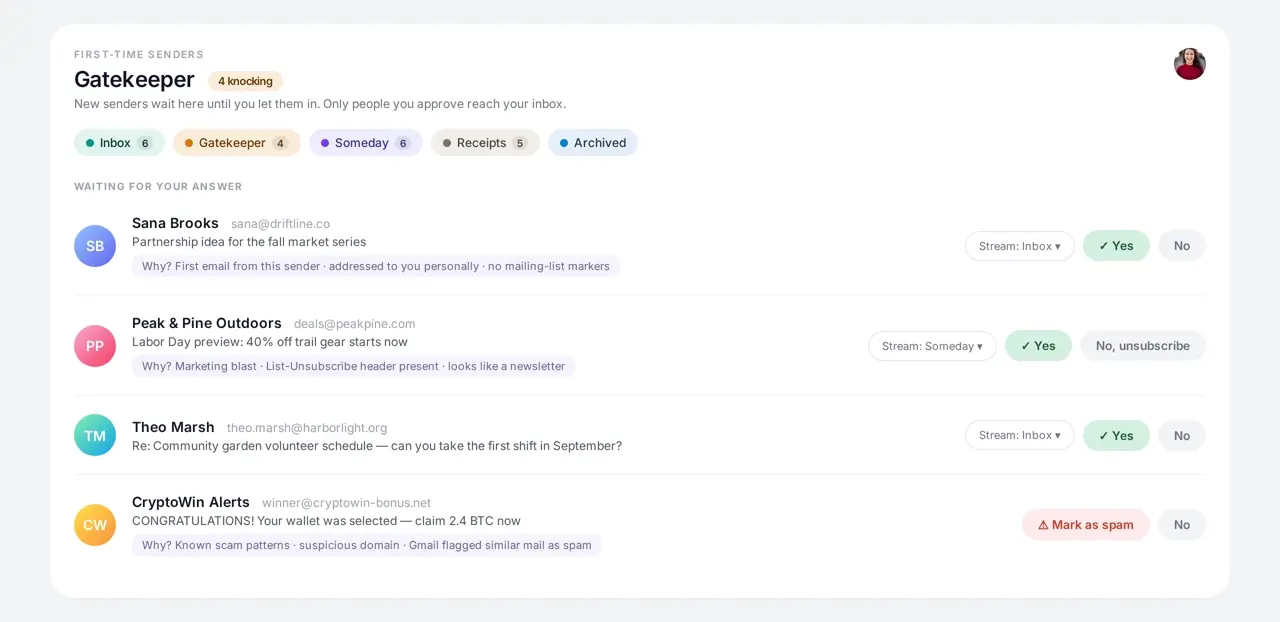
New senders wait in Gatekeeper.
Your answer holds forever, and bulk mail can be unsubscribed on the spot.
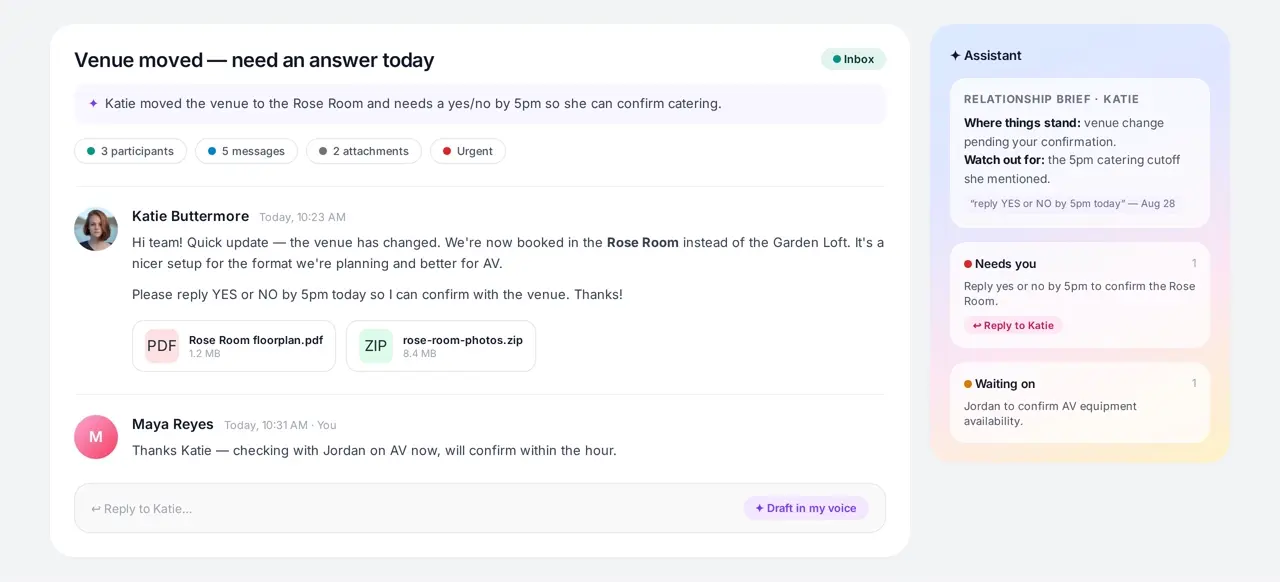
AI summary, attachment index, relationship brief, and one-tap reply drafting — all in one view.
No migration, no new address, no import wizard.
Connect Gmail, screen your senders once, and your mail starts sorting itself.
Sign in with Google and grant read-only mail access. Your mail stays in Gmail.
The Gatekeeper shows everyone new. Say yes, no, or unsubscribe once.
Inbox, Someday, and Receipts keep different mail apart. The assistant surfaces what needs you.
Ask Mango Pop's built-in help assistant a question or open the complete manual. Both explain the app in plain language, so you never have to guess where something is.
Open Help inside Mango Pop and ask how to find, change, or use anything. It answers from Mango Pop's real screens and guides.
Browse setup, Gatekeeper, writing, shortcuts, accounts, billing, and troubleshooting without signing in.
Open the user manualAI drafting, multi-account merge, and team tools when you need them.
Start free — no ads, no data resale, you're the customer.
One mailbox, calmer by default.
$0forever
One mailbox, all the calm.
$12per month
Billed yearly · $15 if you pay monthly
Every hat you wear, one screen.
$24per month
Billed yearly · $29 if you pay monthly
Shared streams and shared standards.
$49per seat / month
Billed yearly · $59 if you pay monthly
Every plan has a monthly AI draft allowance — Team is 1,500 drafts per seat, pooled across the team. Extra drafts are $0.05 each, and we'll tell you before you cross the line. Annual is the price shown; monthly costs a little more.
Straight answers about Gmail, privacy, accounts, and billing.
Founders, freelancers, ops teams, and execs all face the same problem: too much mail, too little time.
Mango Pop turns Gmail into a command center for each of them.
One screen for investor, customer, and vendor mail.
Separate client projects without separate inboxes.
Receipts filed, packages tracked, tasks extracted.
Urgent threads lifted, newsletters set aside.
Handing over your Gmail is a big deal. Here is exactly how we look after it.
Every connection uses HTTPS, and your Google sign-in tokens are encrypted before they are stored.
We ask Google only for your mail and a read-only view of your calendar — never your Drive, Contacts or password.
Database rules make sure each account can only ever see its own mail.
We don't sell your data, and our AI providers don't train their models on your mail.
Free forever for one Gmail account.
No credit card required.