How to bulk delete Gmail emails.
Clear thousands of messages in a few minutes with search operators and Select all — then stop the pile from coming back.
Four steps to a much smaller mailbox.
This works in plain Gmail on the web. Nothing to install.
- 1
Find the mail with a search operator
Type a search that describes exactly what should go. older_than:1y finds ancient mail, from:noreply@example.com isolates one sender, category:promotions catches marketing, and has:attachment larger:10M finds the storage hogs.
- 2
Select every match, not just the page
Tick the checkbox at the top-left of the list. Gmail selects the visible 50, then offers a link: 'Select all conversations that match this search'. Click it to include the whole result set.
- 3
Delete, then check Trash
Press the trash icon. Everything lands in Trash for 30 days, so scan it once for anything that shouldn't have matched before you empty it.
- 4
Stop the refill
Deleting is only half the job. Unsubscribe from the lists that produced the volume, or the same thousands of messages return within a year.
Search operators worth memorizing
older_than:1yEverything more than a year oldfrom:noreply@example.comOne noisy automated sendercategory:promotionsGmail's marketing tabhas:attachment larger:10MBig files eating your storageis:unread older_than:6mOld mail you never even openedunsubscribe older_than:3mNewsletters you stopped reading
Before you empty Trash
Deleted mail is recoverable for 30 days and no longer. Skim the batch for receipts, tax documents, travel confirmations, and anything with a legal deadline — those belong in an archive, not the bin. And never bulk-unsubscribe from mail Gmail has already marked as spam; that only confirms your address is live.
Better than deleting: never receive it.
A bulk delete is a one-time fix for a recurring problem. Mango Pop sits in front of the Gmail account you already have and decides what gets through.
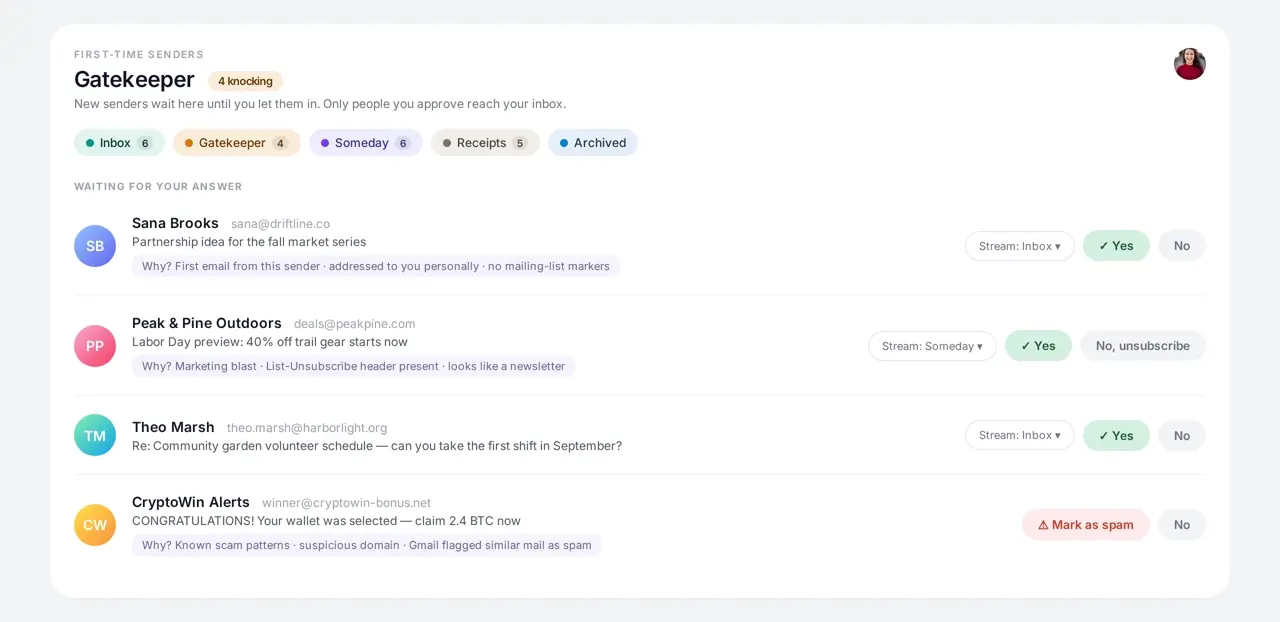
Gatekeeper stops mail before it piles up
Unknown senders wait at the door. You answer yes, no, or unsubscribe once, and that decision holds forever — so there is nothing to bulk delete later.
Someday absorbs the low-priority mail
Newsletters and updates land in their own stream instead of the inbox. Clear the whole stream when you feel like it, or never.
Bulk actions with one-tap Undo
Sweep a sender or a whole stream in one action. Every bulk action shows an Undo, so a wrong sweep costs you a click, not your mail.
Super Save protects what must stay
Mark legal, tax, or travel threads as Super Saved and no bulk archive or delete can touch them.
Bulk deleting in Gmail vs. Mango Pop
| Task | Gmail | Mango Pop |
|---|---|---|
| Clear old clutter | Search, Select all, delete | Sweep a whole stream in one action |
| Undo a mistake | Dig through Trash | One-tap Undo on every bulk action |
| Stop the refill | Unsubscribe one list at a time | Gatekeeper decides once per sender |
| Keep must-keep mail safe | Stars you can still delete | Super Save blocks bulk actions |
| Handle several mailboxes | Repeat in every account | All accounts in one merged list |
Prefer to keep everything and just get it out of the way? Read how to organize Gmail instead.
Questions about bulk deleting Gmail
How do I bulk delete emails in Gmail?
Search for the mail you want gone (for example older_than:1y), tick the select-all checkbox above the list, then click the link that says 'Select all conversations that match this search' and press the trash icon. Gmail deletes the whole matching set, not just the visible page.
How do I delete thousands of old emails at once?
Work sender by sender and date range by date range rather than all at once. Search from:noreply@example.com older_than:2y, select every matching conversation, and delete. Repeat for your noisiest senders. Smaller batches are easier to review and easier to recover from.
Can I recover emails I bulk deleted?
Yes, for 30 days. Deleted mail sits in Gmail's Trash and can be moved back to the inbox from there. After 30 days Gmail removes it permanently, so review a batch before emptying Trash.
Should I delete or archive in Gmail?
Archive anything you might want to find again — it leaves the inbox but stays searchable. Reserve deleting for newsletters, alerts, and automated mail you will never read again, plus large attachments you want off your storage quota.
How does Mango Pop make bulk deleting unnecessary?
Mango Pop screens every new sender at the Gatekeeper before their mail reaches you, and routes newsletters and low-priority updates into a Someday stream instead of the inbox. Bulk actions with one-tap Undo handle whatever slipped through, and Super Save protects threads you never want swept.
Delete once. Then stop the flood.
Mango Pop screens senders, sorts mail into streams, and sweeps the rest — inside the Gmail account you already use. Free for one mailbox.